
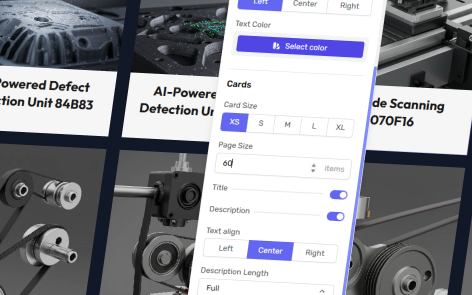
To access the page settings for a grid, click “Page Settings” in the top right-hand corner.
Background Image
Set a background image or video using the media library picker.
Background Color
Set a background color from your theme, or select an alternative color using the color picker. By default this will be defined by the background color set in your page’s theme.
Background Size
Note: Setting is only visible when a background image is set.
Select either “Cover” (when the image fills the background) or “Contain” (when the original image ratio is retained).
Background Position
Note: Setting is visible when a background image is set.
Set the vertical and horizontal position of the background image.
Heading
Title
Choose whether to display a page title or not.
Subtitle
Choose whether to display a page subtitle or not.
Text Align
Set whether the title and subtitle are left, center or right aligned.
Text Color
Override the default heading text color set in the theme.
Slides
Card Size
Set the size of the grid card from:
- XS — Extra Small
- S — Small
- M — Medium
- L — Large
- XL — Extra Large
Page Size
Set the maximum amount of cards that will appear on the page.
Title
Choose whether to display card titles or not.
Description
Choose whether to display card descriptions or not.
Action Button
Choose whether to display card buttons or not.
Text Align
Set whether the title and description of cards are left, center or right aligned.
Description Length
Set the maximum number of lines for a description that will appear on the card.
Media Aspect Ratio
Set the aspect ratio of the image thumbnail on the card from 1:1, 4:3, 16:9, 3:4.
Card Media Fit
Set the whether the image thumbnail on the card is:
- Custom — Set per thumbnail as to whether the thumbnail is fit or fill.
- Cover — Set all thumbnails to fill the available space.
- Contain — Set all thumbnails to fit as per the images original aspect ratio.
Card Style
Choose between the primary and alternative card styles in your theme.
Action Style
Set the action on the card to be a button, arrow or plus.
Filters
Enable Filters
Set whether to display filters or not based on tags applied to each media item.
Filter Position
Set whether to the filters are displayed above or below the grid, or at the bottom of the page.
Filter Alignment
Set whether the filters appear at the left, center or right side of the page.
Filter Style
Set whether the filters are displayed in :
- Pill — all filters are immediately visible
- Nested — in a parent-child relationship
- Sidebar — displayed in a sidebar panel