The following information applies to these components

To customise the content grid’s settings select the grid and make sure BLOCK is selected in the selection bar that appears above or below the block. Then select the to open the following media settings:
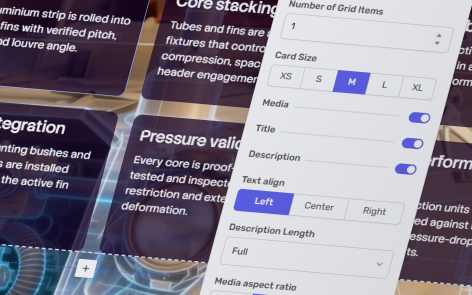
Card Size
You can control the sizes of the media cards. Available options include:
- XS (extra small)
- S (small
- M (medium)
- L (large)
- XL (extra large)
Configure Card Content
You can control which information appears on every card. Available options include:
- Show or hide Media
- Show or hide Title
- Show or hide Description
Text Align
You can align the title and description on each card to its respective media asset to the:
- Left
- Center
- Right
Description Length
Limit the amount of description text shown on each card.
You can choose to have the entire text visible or have anywhere between 1-6 lines of shown description.
Aspect Ratio
Select from the following aspect ratio used for all card media:
- 1:1
- 4:3
- 16:9
- 3:4
Card Media Fit
Choose how media is displayed within each card — Cover or Contain.
Depending on the selected fit mode, media can either fill the available space or be displayed without cropping.
Card Style
Choose between your primary or secondary option for cards & containers of the page’s theme.